Free shipping
Offering free shipping is a great way to encourage customers to complete their purchases. This guide describes how to set up a free shipping promotion in your Shopify store and match it with the free shipping progress bar in Mind.
Mind shows a message and a progress bar in the cart, such as Spend $120.00 more for FREE shipping. When the cart total reaches the threshold, the message changes to Your order now has FREE shipping!. The bar appears in the cart drawer and in the order summary of the cart page.
guide-free-shipping-1.webp
Step 1: Create a free shipping discount
- On your store's Shopify admin page, from the left-side menu, select Discounts.
- Select Create discount.
- Under Select discount type, choose Free shipping.
- Choose Automatic discount so the discount applies without a code, or Discount code and enter a name (for example
FREESHIP600). - Under Minimum purchase requirements, select Minimum purchase amount and enter the required value (for example
600). - (Optional) Choose the shipping countries where this applies, and set an end date.
- Select Save to activate your discount.
guide-free-shipping-5.webp
Step 2: Set the free shipping threshold in the Theme editor
- From the left-side menu, select Sales channels > Online store > Themes.
- In the Current theme section, select Customize to open the Theme editor.
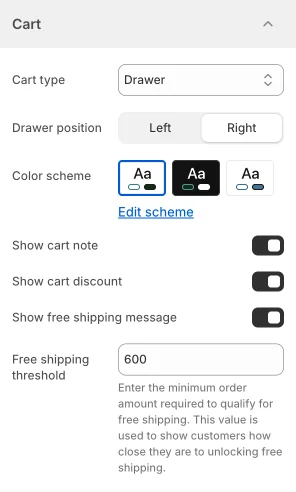
- Open Theme settings > Cart.
- Check that Show free shipping message is enabled.
- In Free shipping threshold, enter the same amount you set in Step 1 (for example
600). Enter the amount in your store's default currency; Mind converts it for shoppers who browse in another currency. - To show the bar in the cart drawer, set Cart type to Drawer. The cart page shows the bar with any cart type.
- Select Save.
The progress bar only shows a message. Free shipping itself comes from the discount you created in Step 1, so always change both together.
Final check
Test your store by adding products to the cart and make sure the free shipping message updates correctly as the cart total changes, and that shipping is free at checkout once the required amount is met.
To change the wording of the messages, select the ... button next to your current theme, select Edit default theme content, and search for free shipping.
If you need further assistance, contact us at [email protected].